
What is Keycloak? A Developer's Introduction to Identity and Access Management
 Muhammed Oğuz · Software Engineer
TL;DR
Keycloak is a free, open-source Identity and Access Management (IAM) solution. It handles authentication, authorization, single sign-on, and user management so you don't have to build any of that yourself. If your application needs login, roles, or SSO, and you want full control over your infrastructure, Keycloak is the standard.
Imagine you're building a SaaS dashboard
You're three weeks into a new project. Let's call it InvoiceFlow, a B2B SaaS that lets companies track and approve their invoices. The MVP is shaping up: customers can upload invoices, approvers can sign off on payments, finance teams can run reports.
Then the founder drops a list of "small" requirements before launch:
- Each customer needs to invite their own teammates and assign them roles: admin, approver, viewer.
- One enterprise customer demands SSO via their corporate Active Directory.
- Another wants their employees to log in with Google Workspace.
- Compliance requires MFA for anyone approving invoices over €50,000.
- Oh, and please add "Sign in with GitHub" for the developer-tools customer.
You stare at the editor. Where do you start? Build all of this yourself, or delegate it to something that already does it well?
This is exactly the problem Identity and Access Management (IAM) solves. And Keycloak is the most popular open-source IAM server you can run yourself.
Authentication vs Authorization, in plain terms
Every app has to answer two fundamental questions about every user:
- Authentication: Who are you? When Alice logs in to InvoiceFlow with her email and password (and a TOTP code from her authenticator app), she's proving she is who she claims to be.
- Authorization: What are you allowed to do? Once Alice is authenticated, can she approve a €100,000 invoice? View the audit log? Delete a customer? Those are authorization questions.
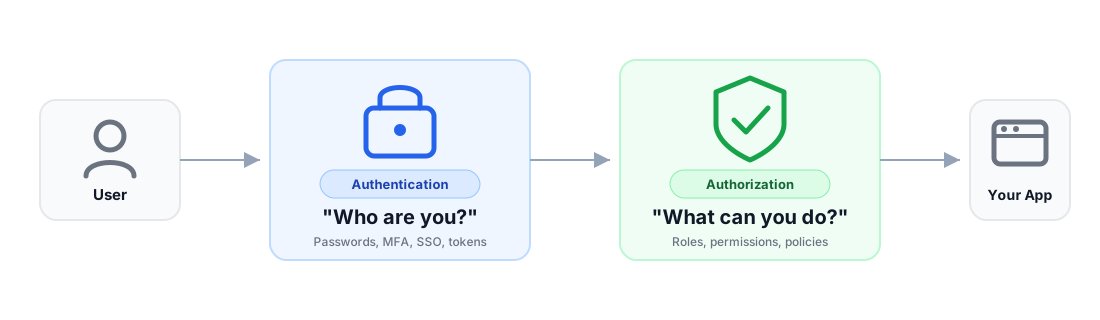
Both are surprisingly hard to get right. Authentication alone needs password hashing, session management, MFA, brute-force protection, and secure logout. Authorization needs role management, scoping, and policy evaluation. Building these from scratch is one of the most common sources of preventable security incidents.
You could build all of this yourself, but doing so securely and correctly takes significant time and expertise, especially when dealing with MFA, federation, session management, and the long tail of security edge cases.
How Keycloak fits in your stack
As shown in the diagram below, Keycloak runs as a separate service that sits between your users and your applications:
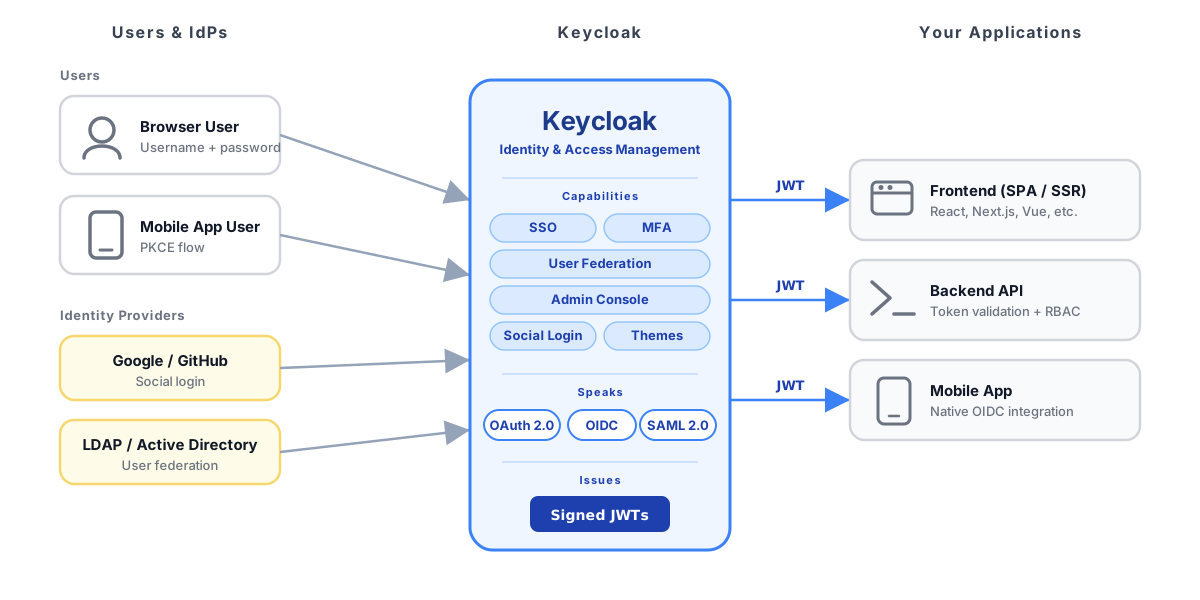
The architecture above shows where things sit. The sequence below shows when things happen during a single login:
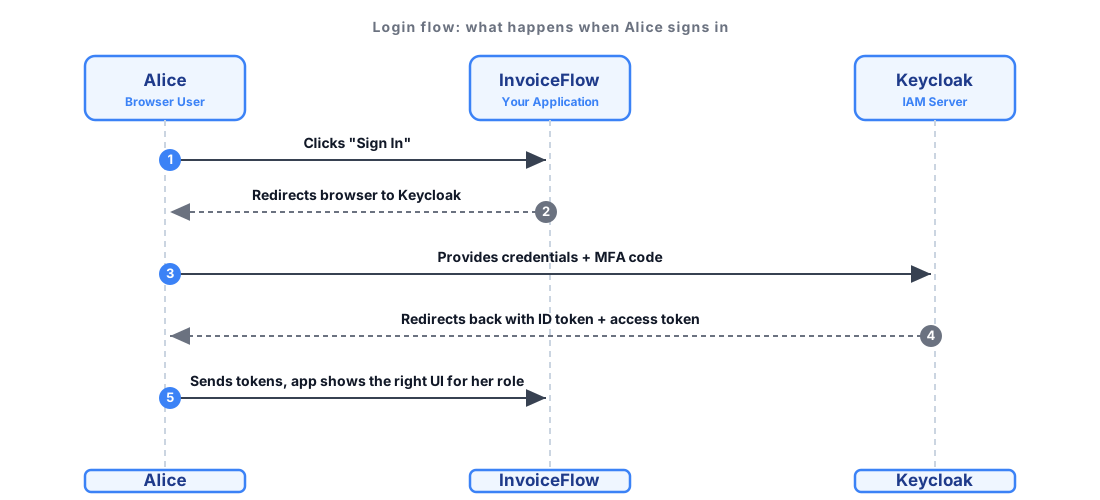
In words:
- Alice clicks Sign In.
- InvoiceFlow redirects her browser to Keycloak.
- Keycloak shows the login page (your branded one), checks her credentials, prompts for MFA if required, and federates with Google, Active Directory, or LDAP if that's how her company logs in.
- On success, Keycloak redirects back to InvoiceFlow with two signed JWT tokens:
- An ID token that proves who the user is (e.g.,
{ "sub": "alice", "email": "alice@acme.com", "roles": ["approver"] }). - An access token used by InvoiceFlow's API to authorize Alice's requests. Access tokens are typically short-lived and expire after a set time, while refresh tokens allow applications to obtain new access tokens without forcing the user to log in again.
- An ID token that proves who the user is (e.g.,
- InvoiceFlow validates the tokens and shows Alice the right UI for her role.
Your application code never touches passwords, never stores credentials, never implements MFA logic, never speaks to Active Directory. Keycloak does all of it. Your app just trusts the signed token Keycloak hands over.
What happens next? When Alice performs an action (such as approving an invoice), her application sends the access token along with the API request. The backend service validates the token and checks her roles or permissions before allowing or denying the action.
Without Keycloak, you would need to:
- build login flows
- implement MFA
- integrate identity providers
- manage sessions and tokens securely
What is Keycloak?
Keycloak is an open-source IAM solution originally developed by Red Hat. In 2023 it joined the Cloud Native Computing Foundation (CNCF) as an incubating project, making it a vendor-neutral, community-driven effort backed by the same foundation that hosts Kubernetes.
The project also went through a major architectural shift: starting with version 17, Keycloak migrated its underlying runtime from WildFly to Quarkus. The result is dramatically faster startup times, lower memory footprint, and a much better fit for containerized and Kubernetes-native deployments. If you come across older tutorials referencing standalone.xml or WildFly subsystems, those apply to legacy versions only.
Core concepts you'll encounter
A few terms show up everywhere in IAM. You'll see them throughout the rest of this article:
- Single Sign-On (SSO): Alice logs in to InvoiceFlow once and can also access the admin reporting tool, without typing her password again. That's SSO.
- Multi-Factor Authentication (MFA): Alice typing in a TOTP code from her authenticator app on top of her password. Required for any approval over €50,000.
- OpenID Connect (OIDC): The modern standard for answering "who is this user?", built on top of OAuth 2.0. Keycloak speaks this fluently.
- SAML 2.0: An older XML-based protocol still required by many enterprise customers. Keycloak supports both OIDC and SAML, so you can serve both kinds of customer at once.
These aren't Keycloak-specific. They are industry standards that Keycloak implements.
Key Keycloak concepts
Now that you've seen what Keycloak does, let's look at how it organizes things internally. A few core concepts shape the admin console and your day-to-day mental model.
Realms
A realm is an isolated space for managing a set of users, credentials, roles, and clients. Think of it as a tenant boundary. A single Keycloak instance can host multiple realms, each completely independent.
For InvoiceFlow, you might run two customer realms: one for Acme Corp (federated with their Active Directory) and one for Globex (using social login + email + password). Each realm has its own users, settings, and login-page branding.
Clients
A client is an application or service that is registered with Keycloak and can request authentication. InvoiceFlow's React frontend, its Node.js backend API, and its background invoice-processing worker each register as separate clients. Clients are configured with redirect URIs, allowed scopes, and protocol settings.
Users, roles, and groups
Users are the people (or service accounts) that authenticate. Roles define what they can do: admin, approver, viewer. Groups let you bundle roles for convenience: a Finance group could include approver + report-viewer so that adding a new finance hire is one click.
In InvoiceFlow, Alice has the approver role in Acme's realm. Her colleague Bob has viewer. Roles can be realm-level (global) or client-level (scoped to a specific application).
Identity providers
Identity providers are external systems that Keycloak can federate with. Want Acme's users to log in with Google Workspace? Add Google as an identity provider in Acme's realm. Need Globex users to come from LDAP? Configure it as a federation provider. Keycloak handles the protocol negotiation and presents a unified login experience.
Authorization
Keycloak doesn't just handle "who is this user?"; it also helps answer "what are they allowed to do?". Keycloak offers two approaches to authorization:
- Roles and groups (RBAC): The simplest form. Assign roles to users (or groups), and Keycloak includes them as claims in the issued tokens. Your application reads the claims and enforces access accordingly. InvoiceFlow checks
if (token.roles.includes("approver")) { ... }.
Where RBAC stops being enough: RBAC works well for simple role-based access, but starts to break down when access depends on context (such as data attributes, time, geography, or relationships between users and resources).
- Authorization Services: A built-in fine-grained authorization engine based on resources, scopes, and policies. You define resources (e.g.,
invoice), scopes (e.g.,read,approve), and policies (e.g., "only managers in EU region, only during business hours"). Keycloak evaluates them server-side and returns a permit or deny decision.
Most teams start with RBAC and reach for Authorization Services (or layer their own policy engine on top) as access control requirements grow in complexity.
Themes
Every user-facing page in Keycloak (login, registration, forgot password, account management) is rendered from a theme. You can customize these to match your brand. Acme's users see Acme's login page, Globex's users see Globex's. Themes are built with FreeMarker templates, HTML, and CSS, giving you full control over the look and feel.
When should you use Keycloak?
Keycloak is a strong fit when:
- You have multiple applications that need shared authentication. SSO across a suite of services is Keycloak's bread and butter.
- You need user federation. If your users already exist in LDAP, Active Directory, or another external system, Keycloak can federate with them without forcing a migration.
- You want full control over your auth infrastructure. Keycloak is self-hosted. Your data stays on your servers. You decide how it's deployed, scaled, and backed up.
- Compliance and data residency matter. Regulated industries and government projects often require that identity data doesn't leave specific jurisdictions. Self-hosted Keycloak gives you that control.
- You need standard protocol support. If your ecosystem includes both modern (OIDC) and legacy (SAML) applications, Keycloak bridges both.
For a personal side project with a single login form, Keycloak is likely overkill. A simple JWT library or a lightweight auth helper is enough. Keycloak shines when the authentication problem is bigger than any single application.
Getting started
The fastest way to try Keycloak is with Docker:
docker run -p 8080:8080 \
  -e KC_BOOTSTRAP_ADMIN_USERNAME=admin \
  -e KC_BOOTSTRAP_ADMIN_PASSWORD=admin \
  quay.io/keycloak/keycloak:26.0 \
  start-dev
This starts Keycloak in development mode on http://localhost:8080. From there:
- Log into the admin console at
http://localhost:8080withadmin/admin. - Create a realm for your application.
- Register a client and configure the redirect URI to point to your app.
- Create a test user and assign them a role.
- Integrate your app using an OIDC library in your framework of choice to redirect to Keycloak for login.
The official Keycloak documentation has comprehensive guides for each step.
Be aware: there is a real learning curve. Keycloak's admin console has a lot of options, and production deployments require decisions about database backends, clustering, caching, reverse proxy configuration, and theme customization. The basics are quick to pick up, but mastering Keycloak takes time.
In summary
If you only remember five things from this article:
- IAM is hard. Authentication, authorization, MFA, SSO, and federation are years of investment to build correctly. They are also where most security incidents happen.
- Keycloak solves it. Free, open-source, CNCF-backed, production-ready. Speaks OAuth 2.0, OpenID Connect, and SAML 2.0 out of the box.
- It runs as a separate service. Your apps redirect to Keycloak for login and receive signed JWT tokens that say who the user is and what they can do.
- It scales from "single app" to "multi-tenant SaaS" via realms, clients, identity brokering, themes, and Authorization Services.
- Use it when you have multiple apps, enterprise SSO needs, federation requirements, or compliance reasons to self-host. Skip it for trivial side projects.
Wrapping up
If you are building anything beyond a trivial side project and your users need to log in, Keycloak deserves a serious look.
At Keymate, we help teams deploy, migrate, and scale Keycloak in production, from first proof-of-concept to millions of users. If you are evaluating Keycloak or running into scaling challenges, we'd be happy to talk.
Need help with Keycloak?
Whether you are starting fresh or scaling an existing deployment, Keymate helps teams deploy, migrate, and operate Keycloak in production.
Stay updated with our latest insights and product updates