
Massive Identity Migration to Keycloak: Tuning the Pipeline for 12 Million Records per Hour
 Hüseyin Akdoğan · Software Craftsman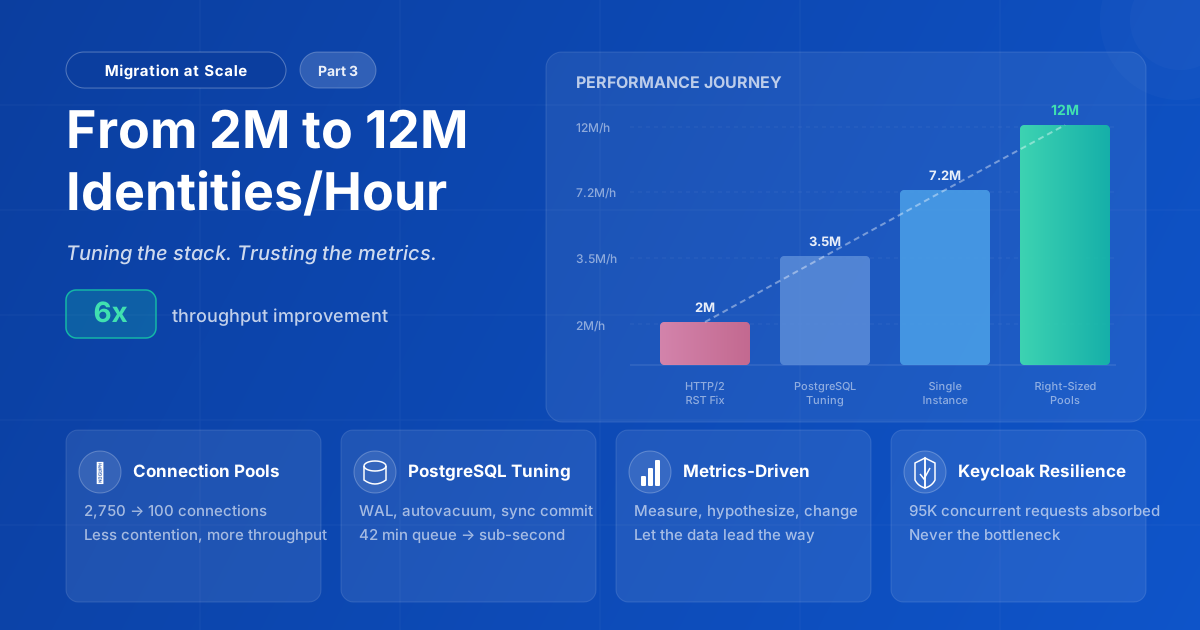
How cutting resources in half made our Keycloak migration six times faster
TL;DR
- This is the third and most technical installment in our series on migrating from Enterprise IAM to Keycloak. While our first post focused on the Business Rationale for Migrating 20+ Million Identities and our second explored the Technical Architecture of our Reactive Migrator Application, we are now heading into the engine room: how we cleared the bottlenecks and scaled throughput from 2M to 12M records per hour.
- We increased migration throughput from 2M to 12M identities/hour — a 6x improvement — by tuning the stack, not by adding more resources.
- The first barrier was HTTP/2 RST flood protection in Quarkus, which terminated connections under extreme concurrency. Disabling it in the controlled migration environment stabilized the baseline.
- Every metric pointed to the database as the bottleneck: Netty pending tasks hit 80K, SQL pool queue delay peaked at 42 minutes, and Keycloak accumulated 95K active requests waiting for DB operations.
- PostgreSQL tuning (WAL sizing, aggressive autovacuum, disabled synchronous commit) improved throughput by 75%, but the pipeline was still saturated.
- Shutting down one Keycloak instance doubled throughput — not because of Infinispan overhead, but because it removed ~1,000 database connections and the lock contention they caused.
- The final breakthrough: cutting connection pools from hundreds to 50 and halving application concurrency. Less pressure on the database meant faster completion per operation and dramatically higher overall throughput.
- Keycloak was never the bottleneck. It absorbed 95K concurrent requests without crashing. Every constraint traced back to the database layer or our own configuration.
Introduction
We cut our computing resources in half, and our migration speed increased sixfold. It sounds counterintuitive, but in the world of high-throughput identity migrations, intuition is often the enemy of performance.
When moving 20+ million user records from an existing PostgreSQL database to Keycloak, raw throughput isn't just a vanity metric; it's a necessity. Every hour of migration represents operational risk, resource consumption, and potential user impact. We started at approximately 2 million records per hour, but through rigorous tuning, we reached a peak of 12 million, completing in hours what would have otherwise taken days.
This article is for engineers who find themselves in similar situations: pushing Keycloak, Vert.x, or PostgreSQL to their absolute limits and wondering why the metrics don't match their expectations. Welcome to the engine room.
The Setup
Before diving into the bottlenecks, here is the infrastructure we started with, the configuration choices we made, and the topology that tied everything together.
Infrastructure
Our migration topology ran on Kubernetes:
| Component | Pods | CPU | Memory |
|---|---|---|---|
| Migrator (Quarkus) | 1 | 30 cores | 64 GB |
| Keycloak | 2 | 30 cores | 64 GB |
| PostgreSQL 15 | 1 | 6 cores | 50 GB |
The migrator application was built with Quarkus using the Reactive PostgreSQL Client, designed to maximize concurrent throughput through non-blocking I/O.
The imbalance in this table (6 database cores backing 90 application cores) was not a sizing decision we could change at the outset. The PostgreSQL server was managed by the client's infrastructure team. We had flagged the need for a more powerful database before the migration began, but the upgrade was not approved until we could demonstrate the bottleneck with production evidence. In the meantime, we worked within the constraints we had.
Initial Configuration
The migrator was designed from the start with tunability in mind: every concurrency parameter, pool size, and thread count is externalized, so we could adjust them without code changes between runs. Our first runs used deliberately high values not because we assumed "more is always better," but to benchmark the system's upper limits and identify where it would break first. The plan was always to stress the stack, read the metrics, and then right-size. As the rest of this article shows, the ceilings we hit were not where we expected, and at nearly every level of the stack, the right answer was less, not more:
Migrator JVM:
-Xms32g -Xmx32g
-XX:+UseZGC
-XX:+ZGenerational
-XX:ConcGCThreads=6
-XX:+AlwaysPreTouch
-XX:ActiveProcessorCount=30
We set a fixed 32GB heap (-Xms32g -Xmx32g) to eliminate resize pauses and ensure memory is reserved upfront.
We chose ZGC with generational mode (-XX:+UseZGC -XX:+ZGenerational) specifically because the migrator's workload creates millions of short-lived objects per second: JSON payloads deserialized from the work queue, HTTP request/response buffers, and Vert.x event objects. Generational ZGC collects these young-generation objects far more efficiently than non-generational ZGC, while keeping pause times sub-millisecond even on a 32GB heap. For a reactive pipeline that sustains 20K+ requests/sec, any GC pause that blocks Netty event loops would cascade into backpressure across the entire system.
We pinned concurrent GC threads to 6 (-XX:ConcGCThreads=6) rather than letting the JVM auto-tune. On a 30-core pod, the default would allocate roughly 25% of cores to GC, which directly competes with Netty event loops and Vert.x worker threads for CPU time. Six threads (20% of available cores) gave ZGC enough capacity to keep up with our allocation rate without starving the reactive pipeline that actually does the work.
The -XX:+AlwaysPreTouch flag pre-faults heap pages at startup, avoiding page fault latency spikes during the migration.
Finally, -XX:ActiveProcessorCount=30 pins the processor count explicitly, keeping the entire JVM configuration self-documenting and deterministic.
Migrator Application:
app.concurrency=512
app.claimers=512
app.fetch-size=2000
quarkus.datasource.reactive.max-size=750
quarkus.rest-client.connection-pool-size=750
quarkus.vertx.event-loops-pool-size=240
The migrator ran 512 claimers (app.claimers), each dispatching up to 512 concurrent HTTP requests to Keycloak (app.concurrency), with a batch size of 2,000 records. This yielded a theoretical ceiling of 262,144 in-flight operations, bounded in practice by the connection pools below. (For the full concurrency model, see Keymate's Guide to Reactive Data Migration article.)
We allocated 750 connections each to the reactive PostgreSQL client and the outbound REST client pool, and set the Vert.x event loop pool to 240 threads.
Keycloak:
KC_DB_POOL_MAX_SIZE=1000
KC_HTTP_POOL_MAX_THREADS=240
QUARKUS_HTTP_LIMITS_MAX_CONCURRENT_STREAMS=10000
QUARKUS_VERTX_WORKER_POOL_SIZE=2000
On the Keycloak side, we configured a database connection pool of 1000 connections and 240 HTTP handler threads. To support HTTP/2 multiplexing under heavy load, we raised the maximum concurrent streams to 10,000 and set the Vert.x worker pool to 2000 threads for blocking operations.
Migration Topology
Here's how all of these components fit together:
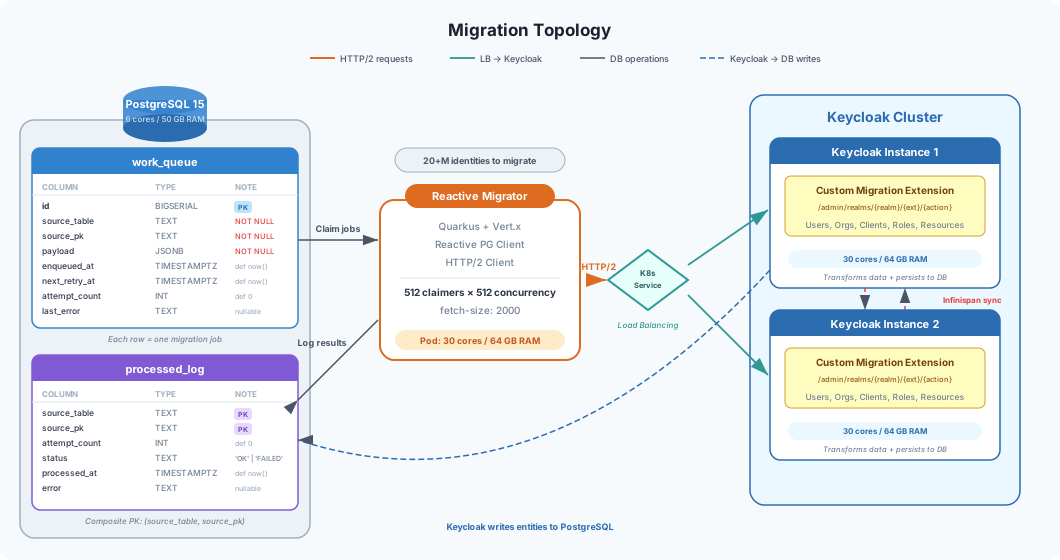
The Reactive Migrator reads jobs from the work_queue table in PostgreSQL, where each row represents a single migration job. Because the source data required transformation before it could map to Keycloak's domain model, we wrote a custom Keycloak extension that exposes dedicated REST endpoints under /admin/realms/{realm}/{extension-name}/{action}. The migrator sends HTTP/2 requests to these endpoints through a Kubernetes Service that distributes traffic across the two Keycloak instances. Each instance handles the data transformation and entity creation internally, covering both standard Keycloak entities (users, clients, client and user roles, resources) and Keymate-specific domain objects such as organizations and departments, which do not exist in Keycloak's default data model and are managed entirely through our custom extension. Results (both successes and failures) are logged back to the processed_log table for traceability and retry handling.
Note: For details on how
work_queueandprocessed_logdrive the retry mechanism and provide end-to-end traceability, see our previous article: Keymate's Guide to Reactive Data Migration.
With the architecture in place, we were ready to push the system hard and see where it would break.
The First Barrier: HTTP/2 RST Flood Protection
Our first bottleneck appeared almost immediately, triggered by the sheer volume of concurrent HTTP/2 requests hitting Keycloak.
The Problem
Shortly after starting the migration, requests began failing with:
maximum number of rst frames reached at 30 seconds
HTTP/2's RST_STREAM frames are used to cancel individual streams within a connection. Under extreme load with many concurrent requests, the rate of these frames can trigger flood protection mechanisms, a security feature designed to prevent denial-of-service attacks.
How to Tune HTTP/2 RST_STREAM Thresholds in Quarkus
These settings are all server-side (QUARKUS_HTTP_*), so they only apply to Keycloak, which is the component receiving and terminating the HTTP/2 connections. The migrator is an HTTP client; it sends requests but does not enforce RST flood limits or negotiate server-side stream parameters. We resolved the issue by tuning Quarkus's HTTP/2 settings via environment variables on Keycloak:
# Disable RST flood protection
QUARKUS_HTTP_LIMITS_RST_FLOOD_MAX_RST_FRAME_PER_WINDOW: '0'
QUARKUS_HTTP_LIMITS_RST_FLOOD_WINDOW_DURATION: '0'

# HTTP/2 protocol tuning
QUARKUS_HTTP_LIMITS_MAX_CONCURRENT_STREAMS: '10000'
QUARKUS_HTTP_HTTP2_MAX_FRAME_SIZE: '16777215'
QUARKUS_HTTP_HTTP2_MAX_HEADER_LIST_SIZE: '65536'
QUARKUS_HTTP_HTTP2_CONNECTION_WINDOW_SIZE: '16777216'
What these values mean:
RST_FLOOD_MAX_RST_FRAME_PER_WINDOWandRST_FLOOD_WINDOW_DURATIONset to0: Completely disables the protection. No matter how many RST frames are generated under high concurrency, the connection won't be terminated.MAX_CONCURRENT_STREAMS=10000: Allows up to 10,000 concurrent HTTP/2 streams per connection, enabling massive request multiplexing.MAX_FRAME_SIZE=16777215: Maximum HTTP/2 frame size (~16MB). Larger frames reduce protocol overhead for bigger payloads.MAX_HEADER_LIST_SIZE=65536: Maximum HTTP header size (64KB). Sufficient for migration requests with metadata.CONNECTION_WINDOW_SIZE=16777216: HTTP/2 flow control window (16MB). Larger windows prevent flow control stalls on fast networks.
Warning: Disabling RST flood protection should only be done in controlled migration scenarios, never in production environments exposed to external traffic.
With this barrier removed, we resumed the migration at approximately 2 million records per hour.
Reading the Metrics
At 2 million records per hour, the system was under so much pressure that Keycloak 26.3.2's metrics endpoint was largely unresponsive, itself a sign of how saturated the pipeline had become. When we could capture snapshots, the active request gauge was peaking at ~95K: requests were arriving far faster than they could complete. Yet the infrastructure metrics told a paradoxical story:
- CPU utilization: ~15%
- Memory utilization: ~50%
- Database connection pool: 2,750 configured across all components, ~500 actively executing queries
The low active-query count was deceptive. In PostgreSQL, every connection spawns a dedicated backend process. Even idle, 2,750 connections meant 2,750 processes competing for memory and CPU on a 6-core server. The gap between the request submission rate and actual throughput was the first red flag: something was blocking completion, not submission.
Metric: Netty EventExecutor Tasks Pending
Our first clue came from the Vert.x metrics. The netty_eventexecutor_tasks_pending metric showed alarming values:
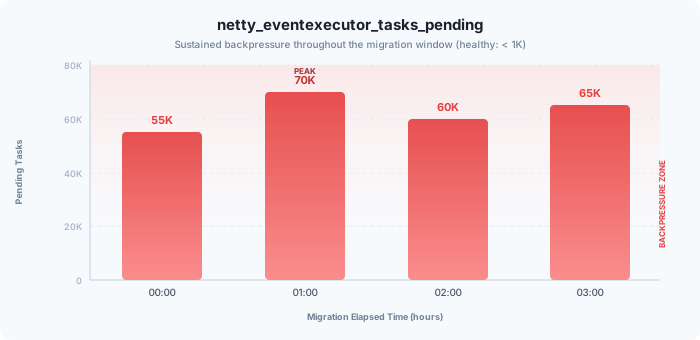
With 20,000 to 80,000 tasks perpetually queued in the event loop, we had severe backpressure. The event loops were overwhelmed, not by CPU, but by waiting.
Metric: SQL Pool Queue Delay
The smoking gun appeared in the SQL pool metrics:
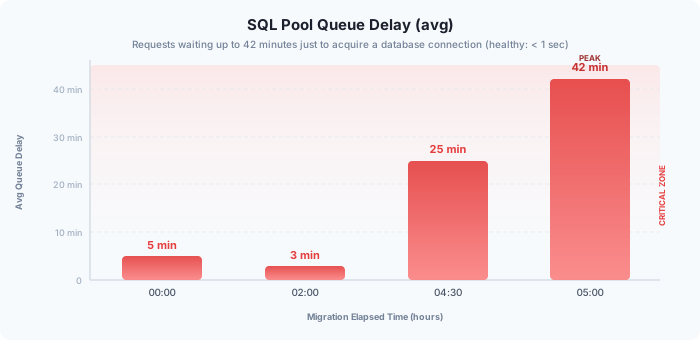
Requests were waiting up to 42 minutes just to acquire a database connection. This wasn't a connection pool size problem; it was a database throughput problem.
Metric: Keycloak HTTP Active Requests
Keycloak's http_server_active_requests confirmed the bottleneck:
- Peak: ~95,000 active requests
- Sustained: 60,000-80,000 active requests
These requests weren't being processed; they were waiting, mostly for database operations to complete. What's notable is that Keycloak never crashed or became unresponsive under this extreme pressure. It absorbed 95K concurrent requests, kept accepting new ones, and continued serving them as fast as the database would allow. The bottleneck was never Keycloak itself.
The Database Investigation
Every metric was pointing in the same direction: requests were piling up in event loops, connections were stuck waiting for the database, and Keycloak was accumulating tens of thousands of active requests that couldn't be completed. The bottleneck was clearly behind the database connection pool. We started inspecting the database directly.
LWLock: BufferContent
The active sessions view revealed the culprit: numerous sessions showing LWLock: BufferContent in the wait_event column.
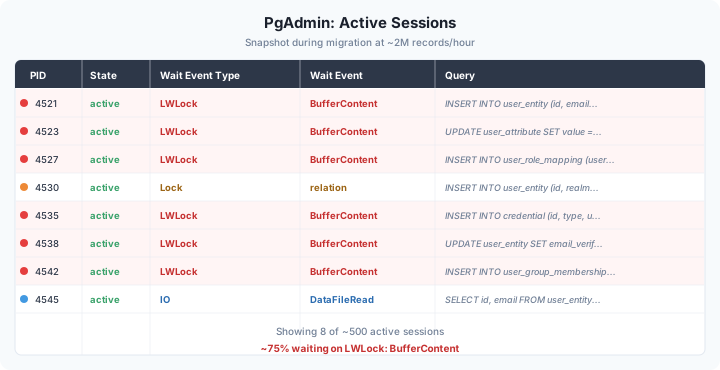
This lightweight lock indicates contention on shared buffer pages, typically caused by:
- High concurrent access to the same pages
- Excessive dirty pages from heavy write workloads
- Vacuum operations competing with normal queries
Dead Tuple Accumulation
Deeper investigation revealed that user_entity (the primary table being written to) had accumulated 2.5 million dead tuples. Autovacuum was running but couldn't keep pace with the write rate.
Query Plan Analysis
While investigating the lock contention, we also reviewed the query execution plans of our custom migration extension's endpoints. One of the most frequent queries was performing sequential scans that only became a problem at migration-scale concurrency; under normal Keycloak operation, the table size and request volume would never trigger this behavior. Adding a targeted index brought that endpoint's response time from 90 seconds down to 30 seconds, a meaningful gain, though as the following sections show, the deeper bottlenecks lay elsewhere.
PostgreSQL Tuning
The investigation gave us a clear picture: dead tuples were bloating tables, autovacuum couldn't keep up with the write rate, and frequent checkpoints were adding I/O pressure on top of an already saturated disk. We addressed these on three fronts: expanding WAL capacity to reduce checkpoint frequency, disabling synchronous commit to eliminate fsync latency, and making autovacuum significantly more aggressive on high-write tables.
WAL and Checkpoint Configuration
We increased WAL capacity to reduce checkpoint frequency:
ALTER SYSTEM SET max_wal_size = '8GB';   -- was 1GB
ALTER SYSTEM SET min_wal_size = '2GB';   -- was 80MB
SELECT pg_reload_conf();
Synchronous Commit
For the migration workload (where we could tolerate potential loss of the last few transactions on crash), we disabled synchronous commit:
ALTER SYSTEM SET synchronous_commit = off;
SELECT pg_reload_conf();
We also configured this at the session level in the migrator's connection string, as a safeguard ensuring the migrator's connections would retain this setting even if the global configuration was reverted during the migration:
quarkus.datasource.reactive.url=postgresql://host:5432/db?options=-c synchronous_commit=off -c work_mem=64MB
Note: The
optionsparameter values must be URL-encoded in practice (%20for spaces,%3Dfor=). The decoded form is shown here for readability.
Aggressive Autovacuum
We configured table-level autovacuum settings for high-write tables:
ALTER TABLE user_entity SET (
    autovacuum_vacuum_scale_factor = 0.01,
    autovacuum_analyze_scale_factor = 0.02,
    autovacuum_vacuum_cost_limit = 5000,
    autovacuum_vacuum_cost_delay = 0
);
Global autovacuum settings were also adjusted:
ALTER SYSTEM SET autovacuum_max_workers = 6;              -- was 3 (requires restart)
ALTER SYSTEM SET maintenance_work_mem = '1GB';            -- was 64MB
ALTER SYSTEM SET autovacuum_vacuum_scale_factor = 0.05;
ALTER SYSTEM SET autovacuum_analyze_scale_factor = 0.02;
SELECT pg_reload_conf();
WAL Bypass for Migration Tables
For tables receiving heavy inserts during migration, we temporarily disabled WAL:
ALTER TABLE target_table SET UNLOGGED;
-- Run migration
ALTER TABLE target_table SET LOGGED;
Warning:
SET UNLOGGEDacquires anACCESS EXCLUSIVElock, blocking all concurrent reads and writes on the table. We ran this during a migration pause with no active transactions on the target tables. Unlogged tables are also not crash-safe and are not replicated, so only use this for data that can be regenerated.
Note: Every change in this section (WAL parameters, synchronous commit, autovacuum settings, unlogged tables) was applied specifically for the migration workload. Before starting, we prepared a revert set that captured the original configuration for each parameter. Once the migration completed, we applied the revert set to restore the database to its stable, production-ready configuration.
Results After Database Tuning
With the PostgreSQL optimizations in place, throughput increased to 3.5 million records per hour, a 75% improvement.
The most visible change was in the SQL pool queue delay, which dropped from a peak of 42 minutes to single-digit minutes. Autovacuum was now keeping pace with the write rate, and the reduced checkpoint frequency eased I/O pressure on the disk. Dead tuple counts on user_entity stabilized instead of climbing.
Still, single-digit minutes of queue delay was far above the sub-second healthy threshold. The database was performing better, but the pipeline was still saturated. The metrics pointed to another layer.
The Cluster Sync Experiment
With two Keycloak instances, every write operation required cluster synchronization via Infinispan. We hypothesized this distributed cache overhead was a significant contributor to the latency we were seeing.
To test this theory, we temporarily shut down one Keycloak instance.
The result: throughput jumped to 7.2 million records per hour, roughly doubling.
At first glance, this seemed to confirm the Infinispan hypothesis. But the metrics told a more nuanced story. During the roughly 1.5-hour window with two instances running, the pg_locks_count dashboard showed rowexclusive, rowshare, and accessshare locks all sitting at peak levels. The SQL pool queue size was spiking to 80,000-100,000 pending acquisitions, and worker pool queue delay was oscillating between 50 seconds and 2 minutes. The moment we switched to a single instance, all of these collapsed: lock counts dropped within seconds, the SQL pool queue size flatlined to zero, and worker pool delay vanished entirely.
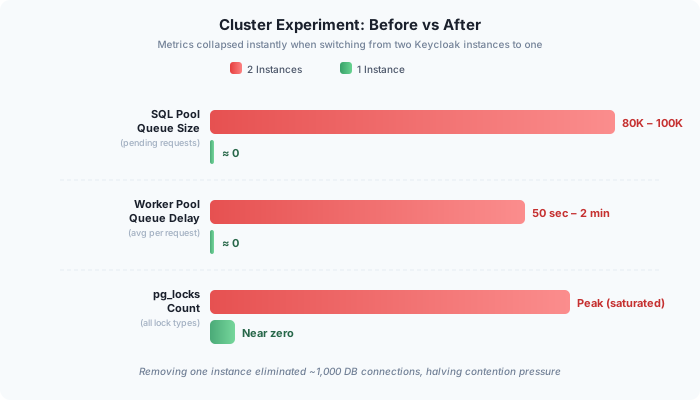
What had actually changed? With two Keycloak instances, each configured with a pool of 1,000 DB connections plus the migrator's 750, the database was facing roughly 2,750 concurrent connections. Shutting down one instance immediately removed ~1,000 connections from the equation. The throughput doubled not because cluster synchronization disappeared, but because the database was no longer drowning in connection contention.
Infinispan's cache write latency did decrease slightly after the change, confirming that distributed overhead exists. Our migration experience confirmed what the Keycloak maintainers have long recommended: Embedded Mode is the right choice for high-performance scaling. Based on this, we later configured Keycloak to run Infinispan in embedded mode, eliminating cross-node cache synchronization and keeping cache operations local to each JVM. But even before that change, the dominant factor was clearly on the database side: fewer connections meant fewer lock conflicts, shorter transaction times, and a pipeline that could finally flow instead of queue.
This finding reframed our understanding of the problem. We had been looking at the application layer for answers, but the real constraint was how many concurrent operations the database could handle efficiently. Based on this evidence, we upgraded the database server from 6 cores to 16 cores to give PostgreSQL more headroom for parallel operations, autovacuum workers, and checkpoint I/O. The experiment also pointed directly to our next optimization: if halving the connection pressure doubled throughput, what would happen if we deliberately right-sized the pools?
The Counter-Intuitive Fix: Less is More
The cluster experiment had given us a clear signal: removing ~1,000 connections by shutting down one instance doubled throughput. The logical next step was to push this insight further. If the database performed better with 1,750 concurrent connections than with 2,750, what would happen if we dropped that number aggressively?
We went from generous pool sizes to deliberately minimal ones, cutting both the migrator and Keycloak connection pools from hundreds down to 50 each, and halving application concurrency from 512 to 256. We also reduced the Keycloak HTTP worker threads and Vert.x event loops, both of which had been set to 240 for high-concurrency headroom, down to 120, and cut the Vert.x worker pool from 2,000 threads to 500. The reasoning was consistent: if the database couldn't keep up, pushing more concurrent work into the pipeline only deepened the queue.
The Changes
| Component | Parameter | Before | After |
|---|---|---|---|
| Migrator | DB pool (reactive.max-size) |
750 | 50 |
| Migrator | app.concurrency |
512 | 256 |
| Migrator | app.claimers |
512 | 256 |
| Keycloak | DB pool (KC_DB_POOL_MAX_SIZE) |
1000 | 50 |
| Keycloak | KC_HTTP_POOL_MAX_THREADS |
240 | 120 |
| Keycloak | QUARKUS_VERTX_EVENT_LOOPS_POOL_SIZE |
240 | 120 |
| Keycloak | QUARKUS_VERTX_WORKER_POOL_SIZE |
2000 | 500 |
The Impact
Throughput: 12 million records per hour, a 6x improvement from where we started.
The metrics that had been red flags throughout the earlier phases now told a completely different story:
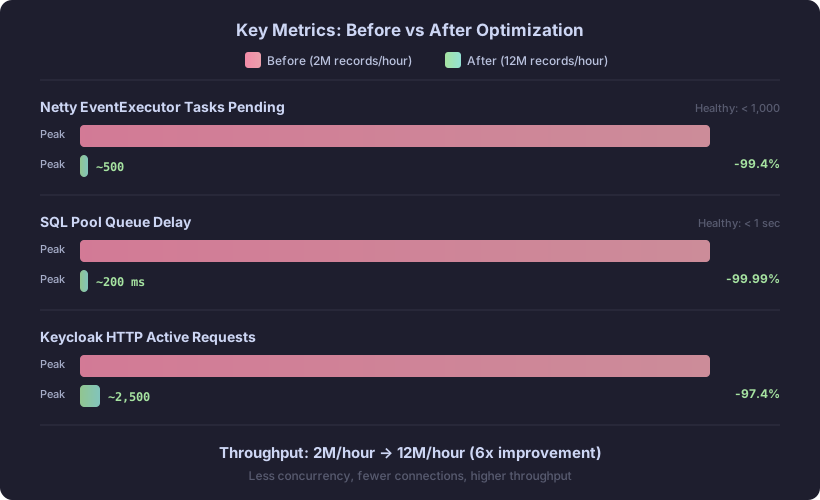
Netty pending tasks dropped from the 20,000-80,000 range to under 1,000. With downstream operations completing quickly, the event loops were no longer backing up; tasks flowed through instead of piling up.
SQL pool queue delay, our most dramatic bottleneck at 42 minutes, collapsed to sub-second levels. With only 50 connections per pool, there was virtually no wait to acquire a connection, and each connection completed its work quickly because the database was no longer thrashing under lock contention.
Keycloak HTTP active requests stabilized around 2,000-3,000 instead of peaking at 95,000. Requests were completing nearly as fast as they arrived, the hallmark of a healthy pipeline.
The pattern was consistent across every metric: by reducing concurrency to match what the database could actually handle, we eliminated the queueing and contention that had been throttling the entire pipeline.
Key Takeaways
Six lessons that kept coming up throughout this migration, each one learned the hard way.
1. Let the Metrics Lead
If you cannot measure it, you cannot improve it. We started with high concurrency values deliberately, to stress-test the stack and find its limits. But the metrics pointed to bottlenecks we did not expect: Netty pending tasks, SQL pool queue delay, and database lock contention all showed that the system was choking on the resources it already had, not starving for more. Without instrumentation, we would never have found the real constraints. Instrument first, optimize second.
2. Bottlenecks are Sequential
Each fix revealed the next constraint. Disabling HTTP/2 RST flood protection let us reach full load. That exposed database lock contention from dead tuple accumulation. Resolving that uncovered DB concurrency saturation from too many connections. And that pointed to over-provisioned pools as the final piece. Performance tuning is not a single fix; it is an iterative process of measure, change, and measure again.
3. Over-Provisioning Creates Contention
More connections do not mean more throughput. With 2,750 concurrent database connections, transactions were spending more time waiting for locks than doing actual work. Cutting pools from hundreds to 50 and halving concurrency eliminated the contention and let each operation complete faster. The database processed more work with fewer concurrent requests.
4. Question the Obvious Explanation
When throughput doubled after shutting down one Keycloak instance, the obvious conclusion was that Infinispan cluster sync was the bottleneck. The metrics showed otherwise: the real factor was the ~1,000 database connections that disappeared with that instance. Misattributing the cause would have led us to optimize the wrong layer. We later configured Keycloak to run Infinispan in embedded mode as recommended by Keycloak maintainers.
5. Right-Size for the Narrowest Point
The database was the funnel. No matter how much concurrency the application could generate, throughput was bounded by how many operations PostgreSQL could handle efficiently. Upgrading from 6 to 16 cores helped, but the real unlock was aligning application-side concurrency with the database's actual capacity.
6. Keycloak Was Never the Bottleneck
Throughout every phase of this migration, Keycloak absorbed extreme load without crashing or rejecting connections. At its peak it held 95,000 concurrent active requests while the database struggled behind it, yet it never stopped accepting new work and continued processing as fast as the downstream layer would allow. Yes, the metrics endpoint became largely unresponsive under that pressure, but Keycloak's core functionality (accepting, transforming, and persisting migration requests) never broke down. Every bottleneck we found was either in the database or in our own configuration; Keycloak itself was never the constraint.
Performance Journey
Each optimization built on the previous one, turning a 2M records/hour baseline into a 12M records/hour pipeline through four distinct phases.
| Phase | Throughput | Change |
|---|---|---|
| After HTTP/2 RST flood fix | ~2M/hour | Stable baseline |
| PostgreSQL tuning | 3.5M/hour | +75% |
| Single Keycloak instance | 7.2M/hour | +106% |
| DB core upgrade + right-sized pools and concurrency | 12M/hour | +67% |
| Total | 12M/hour | 6x |
Conclusion
Migrating 20+ million identities to Keycloak taught us that high-throughput data migration is as much about understanding your bottlenecks as it is about writing efficient code. The reactive, non-blocking architecture of our migrator was necessary but not sufficient. True performance came from reading the right metrics and trusting them over intuition, tuning PostgreSQL for sustained write-heavy workloads, questioning the obvious explanation when the data pointed elsewhere, and right-sizing concurrency to match the database's actual capacity rather than the application's theoretical maximum.
One thing worth emphasizing: Keycloak was never the problem. Under 95K concurrent requests, with a database buckling behind it and metrics endpoints going dark, it kept accepting and processing work without a single crash or connection rejection. Every bottleneck we traced led back to the database layer or our own configuration choices. That is a testament to Keycloak's architecture, and a reminder that when performance degrades, the identity platform may well be the last place you need to look.
Whether you're building a data pipeline, optimizing an API, or troubleshooting a slow application, the methodology remains the same: measure, hypothesize, change, and measure again.
Where this series began
This was the engine room, but the journey started well before the first benchmark. In Part 1, we covered the business rationale behind migrating 20+ million identities away from a legacy IAM platform and why Keycloak was the right target. In Part 2, we built the reactive migrator from scratch, designing a non-blocking, database-backed pipeline with Quarkus and Mutiny that could sustain the throughput we needed. This article picked up where the architecture left off: once the migrator was running, every bottleneck had to be found, understood, and removed.
Series nav > ← Part 1: How Keymate Migrated 20+ Million Identities to Keycloak
← Part 2: Keymate's Guide to Reactive Data Migration
Talk to the Keymate Team
Planning a large-scale IAM migration? Learn how Keymate helps teams migrate safely without downtime.
Stay updated with our latest insights and product updates