
Inside Keycloak Authorization: Resources & Policy Engine
 Eren Kan · Software Engineer
TL;DR
- Keycloak Authorization Services is a built-in policy engine. It answers one question server-side: is this subject allowed to perform this action on this resource, right now? That puts it a level above role-based access control (RBAC).
- A Resource Server is just a Keycloak client with Authorization enabled. It owns the resources it protects, plus two switches that govern every decision: the policy enforcement mode and the decision strategy.
- The vocabulary is small but precise. The Resource Server owns everything, Resources are the things you protect, Scopes are the actions on them, Policies are reusable conditions, and Permissions bind policies to resources and scopes. Get these five nouns right and the rest follows.
- The decision is real code, not magic. The evaluator gathers the policies attached to a resource, its type, and the requested scopes, runs each through its policy provider, and folds the results together with
AFFIRMATIVE,UNANIMOUS, orCONSENSUS. Enforcement mode decides what happens when no policy matches. - At runtime the token endpoint is the decision point. A client exchanges a permission ticket for a Requesting Party Token (RPT) over the UMA grant, and the RPT carries the exact resources and scopes that were granted.
When RBAC runs out of road
In our Keycloak 101 post we built a fictional B2B SaaS called InvoiceFlow and gave its users roles: admin, approver, viewer. Roles travel as claims inside the access token, and the application reads them:
if (token.roles.includes('approver')) {
  // show the Approve button
}
That works beautifully until the rules stop being about who you are and start being about what you are touching and under what circumstances. The founder comes back with the real requirements:
- An approver can approve invoices, but only for their own department.
- Invoices over €50,000 need a manager, not just any approver.
- Approvals are allowed during business hours in the invoice's region, and nowhere else.
- An invoice owner can share a single invoice with an external auditor, without an admin touching roles.
None of these are answerable from a list of role names. The decision now turns on resource attributes (the invoice amount, its department), on runtime context (time, region), and on relationships (owner, requester). This is exactly the wall RBAC hits, and it is the gap Keycloak Authorization Services is built to fill.
Authorization Services moves the decision off the client and into Keycloak. Instead of every service re-implementing "can this person do this," they ask one engine and trust its verdict.
The rest of this post is about how that engine is wired: the objects you configure, how they relate, and the exact path a request takes from "I'd like to approve invoice 123" to a signed permit.
The vocabulary, and how the pieces relate
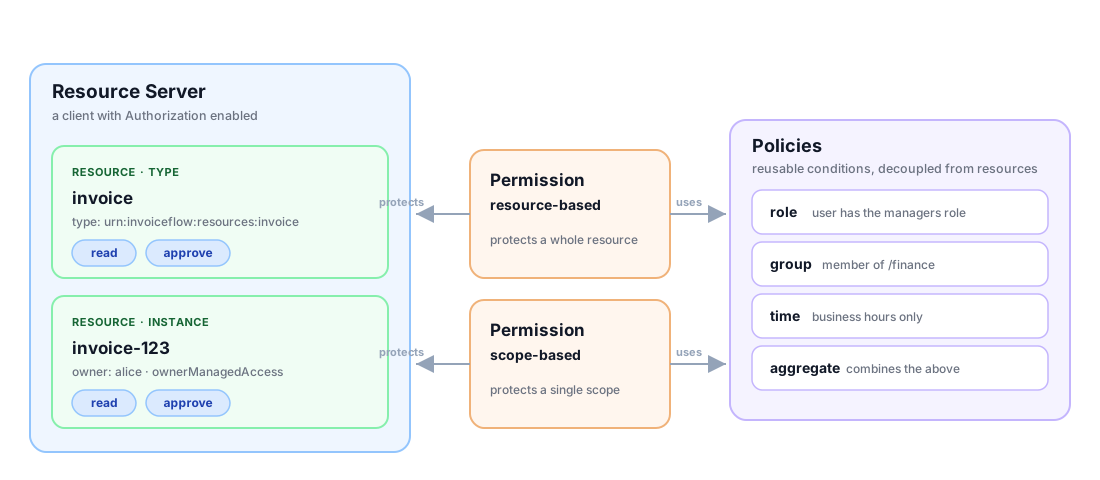
Authorization Services has exactly five nouns. Most confusion about Keycloak authorization is really confusion about these five and how they connect.
Resource Server
A Resource Server is not a new kind of object you create from scratch. In Keycloak's own words, it is "basically an existing client application in Keycloak that will also act as a resource server." You take a confidential client, say InvoiceFlow's backend API, flip on Authorization, and it becomes the container that owns everything else.
The resource server carries two settings that decide the outcome of every evaluation it performs:
policyEnforcementModedecides what to do when no policy matches a request (ENFORCING,PERMISSIVE, orDISABLED).decisionStrategydecides how to combine multiple permissions that touch the same resource or scope. The Admin Console offersAFFIRMATIVEorUNANIMOUShere at the resource-server level;CONSENSUSis available on individual policies and permissions (and can be set on the resource server over REST).
Straight from the DecisionStrategy enum's own documentation:
| Strategy | Grants access when |
|---|---|
AFFIRMATIVE |
at least one policy says permit |
UNANIMOUS (default) |
every policy says permit |
CONSENSUS |
more permits than denies; a tie is a deny |
It also has allowRemoteResourceManagement, which controls whether the application may register its own resources at runtime through the Protection API (more on that later). Internally the resource server is tied to its backing client by clientId.
Resource
A Resource is the thing you are protecting. In InvoiceFlow that might be a specific invoice (invoice-123) or a whole category (invoice). The model has more to it than a name and a URI:
| Field | Meaning |
|---|---|
name |
Unique name within the resource server |
displayName |
Human-friendly label |
type |
A classifier shared by many instances, e.g. urn:invoiceflow:resources:invoice |
uris |
One or more URIs the enforcer matches requests against |
scopes |
The actions available on this resource |
owner |
Who owns it: the resource server, or an end user |
ownerManagedAccess |
Whether the owner can share it (UMA) |
attributes |
Arbitrary key/value metadata available to policies |
Two distinctions matter. First, a resource can be an instance (invoice-123, owned by Alice) or a type (invoice, owned by the application). Type lets you write one policy that covers every invoice. Second, there is a version nuance worth knowing: up to Keycloak 26.4, enabling Authorization auto-created a Default Resource (URI /*), a Default Policy that always granted, and a Default Permission, so a fresh resource server started in a deliberately permissive state you were expected to tighten. Keycloak 26.5 removed that auto-creation. On current Keycloak a freshly enabled resource server starts empty, which under the default ENFORCING mode means it denies everything until you add a policy.
A resource belongs to exactly one resource server. That ownership is the "relationship between Resource Servers and Resources" at the heart of the model: the resource server is the policy boundary, and resources are the protected assets inside it.
Scope
A Scope is an action or aspect of a resource: read, approve, delete, print. Keycloak describes it as something "usually associated with one or more resources in order to define the actions that can be performed." Scopes are how you get verbs into your authorization model instead of protecting resources as all-or-nothing blobs.
This is also the single biggest source of confusion in Keycloak, so it gets its own section next.
Policy
A Policy is a reusable condition. It answers "is this true?" without knowing or caring which resource it will be attached to. A policy has a type (the kind of condition), a logic (positive or negated), and a bag of type-specific config. Keycloak ships a dozen policy types:
role, user, client, client-scope, group, time, regex, aggregate, js, plus the resource, scope, and uma permission types that are themselves modelled as policies under the hood.
Because policies are decoupled from resources, you write "user is in the managers group" once and reuse it everywhere. Policies can also reference other policies (associatedPolicies), which is how aggregate policies and permissions compose smaller rules into bigger ones.
Permission
A Permission is the glue. It binds one or more policies to the resources and/or scopes they protect. There are two flavours:
- Resource-based permission: "to do anything with
invoiceresources, these policies must pass." - Scope-based permission: "to use the
approvescope oninvoice, these policies must pass." This one is finer-grained, because it targets the verb.
So the full chain reads like this. A Resource Server owns Resources; each resource exposes Scopes; Permissions attach Policies to those resources and scopes; and at request time the engine evaluates the relevant permissions and returns permit or deny.
Authorization scopes are not OAuth scopes
When a client logs in it requests OAuth scopes such as openid profile email. Those are part of the OpenID Connect handshake, they can trigger a consent screen, and they decide which claims land in the access token. They are about the token.
Authorization scopes (read, approve) look identical on the page and are completely different in nature. They are never granted by consent, and they never appear because the user asked for them. They show up only after the policy engine evaluates a permission and decides the subject is allowed that action on that resource.
OAuth scopes shape the token at login. Authorization scopes are what a policy decision produces. Same word, unrelated jobs.
Mixing them up causes real bugs. A team adds approve as a client scope, sees it in the token, and assumes the user is authorized, when in fact no policy was ever evaluated.
Where Keycloak sits: PEP, PDP, PAP, PIP
Access-control systems are usually described with four roles. Keycloak maps onto all four, which is a handy way to keep the moving parts straight.
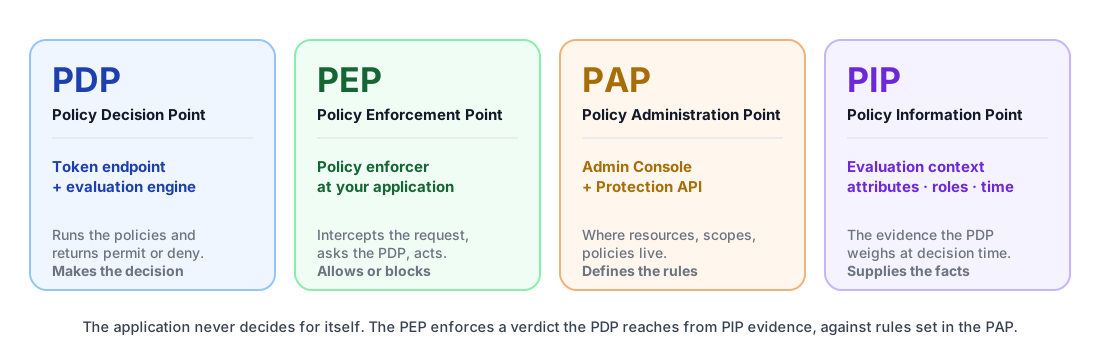
- PDP, the Policy Decision Point. The Keycloak token endpoint that runs the evaluation engine and hands back the decision. The brain.
- PEP, the Policy Enforcement Point. The policy enforcer at your application that intercepts requests, asks the PDP, and allows or blocks them. The bouncer.
- PAP, the Policy Administration Point. The Admin Console and Protection API where you define resources, scopes, policies, and permissions. The rulebook.
- PIP, the Policy Information Point. The evaluation context: user attributes, roles, group membership, client info, the time, request claims. The evidence the PDP weighs.
The takeaway is that, within this model, the application does not make the authorization decision itself. It enforces one made centrally by Keycloak, from the information Keycloak gathers at evaluation time. That does not mean the application decides nothing. Most services still run their own input validation, business rules, and ownership checks; what moves to Keycloak is specifically the "can this subject perform this action on this resource" verdict, which the application then trusts and enforces.
How a decision actually gets made
Most write-ups stop at the diagram. The useful part is the evaluator.
The logic lives in DefaultPolicyEvaluator; here is a simplified excerpt of that control flow:
public void evaluate(ResourcePermission permission, AuthorizationProvider authz,
                     EvaluationContext context, Decision decision, ...) {

    ResourceServer resourceServer = permission.getResourceServer();
    PolicyEnforcementMode enforcementMode = resourceServer.getPolicyEnforcementMode();

    // 1. Authorization switched off for this resource server -> always permit.
    if (PolicyEnforcementMode.DISABLED.equals(enforcementMode)) {
        grantAndComplete(permission, authz, context, decision);
        return;
    }

    // 2. Permission already granted upstream (e.g. a granted UMA ticket) -> permit.
    if (permission.isGranted()) {
        grantAndComplete(permission, authz, context, decision);
        return;
    }

    AtomicBoolean verified = new AtomicBoolean();
    Consumer<Policy> policyConsumer = createPolicyEvaluator(permission, authz, context, decision, verified, ...);
    Resource resource = permission.getResource();

    // 3. Gather every policy that could apply, and run each one.
    if (resource != null) {
        evaluateResourcePolicies(permission, authz, policyConsumer);      // bound to this resource
        evaluateResourceTypePolicies(permission, authz, policyConsumer);  // bound to its type
    }
    evaluateScopePolicies(permission, authz, policyConsumer);             // bound to the requested scopes

    // 4. At least one policy ran -> let the collected decisions stand.
    if (verified.get()) {
        decision.onComplete(permission);
        return;
    }

    // 5. No policy matched. PERMISSIVE allows; ENFORCING (the default) falls through to deny.
    if (PolicyEnforcementMode.PERMISSIVE.equals(enforcementMode)) {
        grantAndComplete(permission, authz, context, decision);
    }
}
Walking through it:
- If the resource server's enforcement mode is
DISABLED, evaluation is skipped and access is granted. This is for switching the whole feature off, not for production. - If the permission arrived already granted, for example a UMA permission ticket the owner approved earlier, it short-circuits to permit.
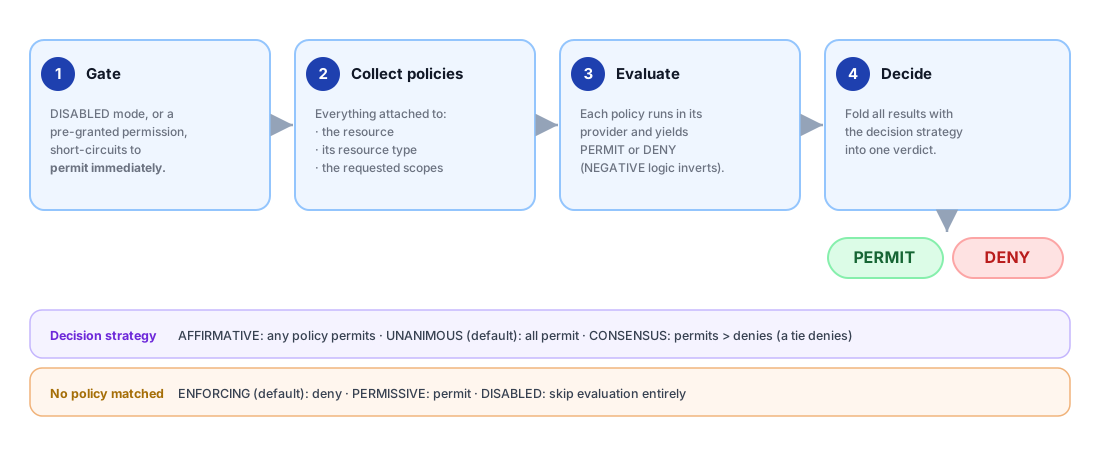
- Otherwise Keycloak collects three buckets of policies and runs each one: those attached directly to the resource, those attached to the resource's type (so a single policy on the
invoicetype covers every invoice), and those attached to the scopes being requested. Each policy is handed to its provider, which sets aPERMITorDENYeffect. - If at least one policy ran, the collected decisions stand and evaluation completes.
- The case that catches people out is when nothing matched. Under
ENFORCING, the default, the request is denied. UnderPERMISSIVEit is allowed. This single switch is the most common foot-gun in Keycloak authorization, so it is worth restating:
ENFORCINGdenies a resource that has no policy.PERMISSIVEallows it. If you turn on Authorization and suddenly everything is 403, you are inENFORCINGwith no policies yet, and that is the system working as designed.
How the decision strategy combines results
A resource can be covered by several permissions, and a permission can chain several policies. Keycloak collapses all those individual PERMIT/DENY effects into one verdict using the decision strategy. Within a single permission, the fold over its associated policies lives in AbstractDecisionCollector.isGranted():
switch (decisionStrategy) {
    case AFFIRMATIVE:                 // at least one PERMIT wins
        for (var d : policyResult.getAssociatedPolicies())
            if (Effect.PERMIT.equals(d.getEffect())) return true;
        return false;

    case CONSENSUS:                   // permits must outnumber denies; a tie denies
        int grant = 0, deny = policy.getAssociatedPolicies().size();
        for (var d : policyResult.getAssociatedPolicies())
            if (d.getEffect() == Effect.PERMIT) { grant++; deny--; }
        return grant > deny;

    default:                          // UNANIMOUS (default): any DENY loses
        for (var d : policyResult.getAssociatedPolicies())
            if (Effect.DENY.equals(d.getEffect())) return false;
        return true;
}
Those are the three strategies from the comparison table back in the Resource Server section, here as real control flow: AFFIRMATIVE needs a single permit, UNANIMOUS fails on any deny, and CONSENSUS counts the votes, with a tie denying.
The strategy exists at two levels: on the resource server, where it resolves conflicts between permissions, and on an individual policy or permission, where it resolves its associated policies. The cross-permission fold at the resource-server level happens a layer up, in DecisionPermissionCollector, which accumulates the granted and denied scopes and consults the resource server's own strategy. A new resource server defaults to UNANIMOUS, which is the safe choice, since every applicable rule has to agree before access is granted.
The logic twist
One more subtlety. Every policy has a logic of POSITIVE or NEGATIVE. NEGATIVE inverts the policy's own outcome, which is how you express "everyone except contractors." You can see it in DefaultEvaluation.grant():
public void grant() {
    if (policy != null && Logic.NEGATIVE.equals(policy.getLogic())) {
        setEffect(Effect.DENY);   // a "granted" negative policy actually denies
    } else {
        setEffect(Effect.PERMIT);
    }
}
So a policy that "matches" can still contribute a DENY if its logic is negated. Small flag, large blast radius. It is worth a comment in your policy descriptions whenever you reach for it.
From request to RPT: the UMA permission-ticket flow
Configuration is half the story. The other half is what happens on the wire when a real request arrives. One common runtime pattern uses the User-Managed Access (UMA) 2.0 grant, with the token endpoint playing the PDP. This is the flow you get when the enforcer is configured to challenge with permission tickets; it is not the only way enforcement plays out, as the end of this section spells out.
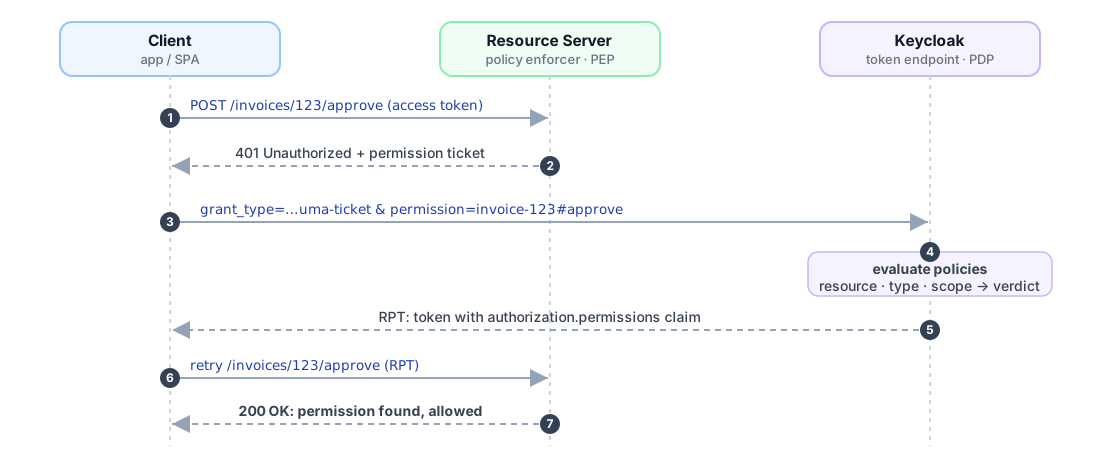
- The client calls the resource server with its ordinary access token:
POST /invoices/123/approve. - The enforcer (PEP) sees no permission for
invoice-123#approvein the token and replies401 Unauthorizedwith a permission ticket, an opaque handle that names the resource and scope being requested. - The client requests an RPT at the token endpoint, using the UMA grant type:
curl -X POST \
  "https://auth.example.com/realms/{realm}/protocol/openid-connect/token" \
  -H "Authorization: Bearer ${ACCESS_TOKEN}" \
  --data "grant_type=urn:ietf:params:oauth:grant-type:uma-ticket" \
  --data "audience=invoiceflow-api" \
  --data "permission=invoice-123#approve"
The call above uses Keycloak's ticketless variant: rather than echoing the 401 ticket back, the client names the resource server with audience and the resource and scope with permission (the resource part may be the resource id, which is the default, or its name as shown here, resolved as a fallback). The strict UMA flow instead replays the challenge with --data "ticket=${PERMISSION_TICKET}". Both reach the same evaluation engine and return the same kind of token.
- Keycloak evaluates the relevant policies (the engine from the previous section) and, if the decision is permit, issues a Requesting Party Token. The RPT is a normal access token with an extra
authorizationclaim:
{
  "aud": "invoiceflow-api",
  "exp": 1716300000,
  "authorization": {
    "permissions": [
      {
        "rsid": "a1b2c3d4-e5f6-7890",
        "rsname": "invoice-123",
        "scopes": ["approve", "read"]
      }
    ]
  }
}
- The client retries the original request with the RPT. This time the enforcer finds
invoice-123#approvein the token's permissions and lets it through.
DecisionPermissionCollector builds each granted permission into the rsid / rsname / scopes entries you see above. There is also a lighter-weight entitlement mode: send the UMA grant with no specific permission, and Keycloak returns every permission the subject currently has on that resource server. That is handy for priming a UI.
Two related modes are worth knowing. If you only need a yes or no, add response_mode=decision and Keycloak skips minting a full RPT, returning a bare { "result": true } instead. That is cheaper on the hot paths discussed later. And when a resource server receives an RPT, it can validate it server-side through token introspection with token_type_hint=requesting_party_token, which echoes back the embedded permissions.
The ticket-and-RPT dance above is one configurable enforcer behavior, not a universal law. Depending on how the policy enforcer is set up, a denied request can instead come back as a plain 403 Forbidden (the token endpoint itself answers 403 with access_denied when a request maps to no permission), or redirect the caller when on-deny-redirect-to is configured. Under PERMISSIVE enforcement mode unmapped requests pass straight through, and under DISABLED enforcement is skipped entirely. An enforcer can also skip acquisition altogether and enforce the permissions already carried in an RPT, decoding and validating the token locally rather than calling back for a new one. Treat the sequence above as the canonical UMA case, then pick the enforcer behavior that fits your service.
How to configure it
You can drive all of this from the Admin Console (Clients → your client → Authorization) or via REST. The shape is always the same: enable authorization, define resources and scopes, write policies, bind them with permissions.
For automation, the Protection API lets a resource server manage its own resources at runtime (when allowRemoteResourceManagement is on). Registering a resource looks like this:
curl -X POST \
  "https://auth.example.com/realms/{realm}/authz/protection/resource_set" \
  -H "Authorization: Bearer ${PAT}" \
  -H "Content-Type: application/json" \
  -d '{
        "name": "invoice-123",
        "type": "urn:invoiceflow:resources:invoice",
        "uris": ["/invoices/123"],
        "scopes": [{ "name": "read" }, { "name": "approve" }],
        "ownerManagedAccess": false
      }'
The ${PAT} is a protection API token, an access token for the resource server's own client carrying the uma_protection scope. The Protection API also exposes permission and policy endpoints, which is what powers owner-managed sharing ("let this auditor see invoice 123") without an administrator editing roles.
Wherever you create them, the two resource-server switches, policyEnforcementMode and decisionStrategy, sit on the Authorization Settings tab and quietly govern everything underneath.
Delivering on the InvoiceFlow promise
Take one of the rules from the top of this post: an approver can approve an invoice only if they are a manager, and only during business hours. That is two policies bound to one scope-based permission. Against the resource server's admin endpoints (/admin/realms/{realm}/clients/{id}/authz/resource-server):
# A role policy: the subject must hold the manager role
POST .../policy/role
{ "name": "Managers only", "roles": [{ "id": "manager", "required": true }] }

# A time policy: only between 09:00 and 18:00
POST .../policy/time
{ "name": "Business hours", "hour": "9", "hourEnd": "18" }

# A scope-based permission binding both to invoice#approve, UNANIMOUS
POST .../permission/scope
{
  "name": "Approve invoices",
  "resources": ["invoice"],
  "scopes": ["approve"],
  "policies": ["<managers-policy-id>", "<business-hours-policy-id>"],
  "decisionStrategy": "UNANIMOUS"
}
UNANIMOUS on the permission is what makes it manager and business hours; switch it to AFFIRMATIVE and either condition alone would grant. The other two rules from the intro, the €50,000 threshold and the department match, depend on the invoice's own data rather than on identity. Those need a policy that can read attributes: either resource attributes on the invoice resource, or claims the enforcer pushes into the evaluation context through its Claim Information Point. Keycloak has no built-in "claim-based" policy type for this; such attributes and claims are evaluated by a JAR-deployed JS policy or a custom policy provider. Here is the hard truth: writing the policy is the easy half. The real work is feeding it trustworthy attributes. The invoice amount and department need to reach the decision somehow either as resource attributes synced with your domain data or as claims a gateway injects at runtime. Keycloak evaluates whatever you hand it, but it doesn't source or maintain those for you. In most real ABAC systems, that attribute pipeline, not the policy language, is where the effort and bugs concentrate. This is where teams stumble in production.
Before you wire an enforcer, the Evaluate tab on the Authorization page (and the matching policy/evaluate endpoint) lets you dry-run a decision: pick a user, a resource, and a scope, and Keycloak shows the permit or deny verdict along with which policies fired. It is the fastest way to confirm a permission does what you think before any traffic hits it.
Where the model shows up: Fine-Grained Admin Permissions
If this object model feels abstract, Keycloak now eats its own cooking. Since 26.2, Fine-Grained Admin Permissions v2 is built directly on Authorization Services and is enabled by default. The admin console's own access control becomes resources, scopes, policies, and permissions: users, groups, clients, and roles are the resources; actions such as view-members, manage-members, map-roles, and impersonate are the scopes; and who may do what is expressed as permissions over them. It is the same five nouns from this post, applied to administering Keycloak itself, which makes it a good place to see the engine in action. (See the Keycloak blog post on Fine-Grained Admin Permissions in 26.2.)
Before you ship
A few things regularly trip teams up. Most are accuracy issues that bite in production, not in the demo.
ENFORCINGvsPERMISSIVE. This is the foot-gun that causes 3am pages. Turning on Authorization with no policies, under the defaultENFORCING, denies everything. That's correct behavior, not a bug, but you need to decide this deliberately for each resource server. Many teams enable Authorization, suddenly see 403s across the board, think it's broken, and disable it. It wasn't broken. They just weren't ready.- JavaScript policies changed, in two steps. You can no longer paste JS into the Admin Console: that management path was removed back in Keycloak 18, so JS policies must be deployed to the server as a JAR. Separately, as of Keycloak 26.6 JavaScript-based policies honor the
scriptsfeature flag (previously they loaded regardless), so the server now has to be started withscriptsenabled for them to work at all. Reach forrole,group,time,regex,client, andaggregatepolicies first, since they cover most needs without code. - The adapters are gone. The legacy Java OIDC adapters (WildFly, the JEE servlet filter, Spring Boot and Spring Security) were deprecated in Keycloak 22 and removed by the 25/26 line; the SAML adapter for WildFly/EAP is the only survivor. Enforce with the standalone
keycloak-policy-enforcerlibrary, or on Quarkus withquarkus-keycloak-authorization. The evaluation engine on the server is unchanged; only the client-side enforcement library moved. - Evaluation has a cost. Every UMA decision is a round trip to the token endpoint and a query against the policy stores. For hot paths, cache RPTs until they expire, prefer resource-type policies over thousands of per-instance ones, and lean on the lightweight token claims (plain RBAC) when a decision genuinely is identity-only.
- It is RBAC and ABAC, not ReBAC. Keycloak evaluates roles, attributes, groups, and context well. What it does not natively model is relationship-based access control: permissions that follow edges in a graph, like "can edit this document because you are on the team that owns the parent folder, three hops up." Systems in the Zanzibar lineage (Google's model, and open implementations such as OpenFGA or SpiceDB) store those relationships as tuples and answer a request by walking the graph, rather than by evaluating a policy attached to a resource. Keycloak has no equivalent tuple store or graph traversal, so for deeply relational domains Authorization Services is a complement to a relationship engine, not a replacement for one.
The right layer for your system
Keycloak Authorization Services is a genuine policy engine hiding inside your identity provider. The model is small (Resource Server, Resource, Scope, Policy, Permission), and the decision logic is concrete code you can read: gather the policies that apply, run each through its provider, fold the results with a decision strategy, and let the enforcement mode handle the empty case.
Where does it fit?
- Plain RBAC roles when the decision is identity-only and the service can read it straight from the token.
- Authorization Services when decisions depend on resource attributes, context, or ownership and you want them made centrally and consistently. The InvoiceFlow rules about amounts, departments, hours, and sharing are the textbook case.
- A dedicated ReBAC engine alongside Keycloak when access is fundamentally about relationships in a graph.
If you are moving from "roles in a token" toward "real decisions about real resources," start by reading Keycloak 101 for the foundations and The Limits of RBAC for why the jump becomes necessary. Then model your first resource, give it one scope, write one policy, and watch the token endpoint hand back a permission.
References
- Keycloak Authorization Services Guide
- Keycloak Policy Enforcer
- Keycloak Authorization Client
- Update on the deprecation of Keycloak adapters
- Quarkus: centralizing authorization with OIDC and Keycloak
- User-Managed Access (UMA) 2.0 Grant for OAuth 2.0
org.keycloak.authorizationsource (keycloak/keycloak)
Upstream Keycloak is a powerful policy engine, but managing granular resources, complex scopes, and evaluation rules at enterprise scale quickly becomes a blind spot. Keymate extends Keycloak with a production-ready, visual control plane to model, audit, and optimize your fine-grained access control in real-time.
Running fine-grained authorization on Keycloak?
Keymate helps teams design, deploy, and operate Keycloak Authorization Services in production, from resource modelling to policy performance under real traffic. Talk to us.
Stay updated with our latest insights and product updates