How Keymate fits together, and where it runs
Keymate's PDP and PEP architecture puts a policy enforcement point (PEP) in the request path and a policy decision point (PDP) behind it. Every request passes an enforcement point, usually the Access Gateway, which asks the decision point to allow or deny it before it reaches the application. It all runs on your own Kubernetes.
The request path: from the Access Gateway to the decision point
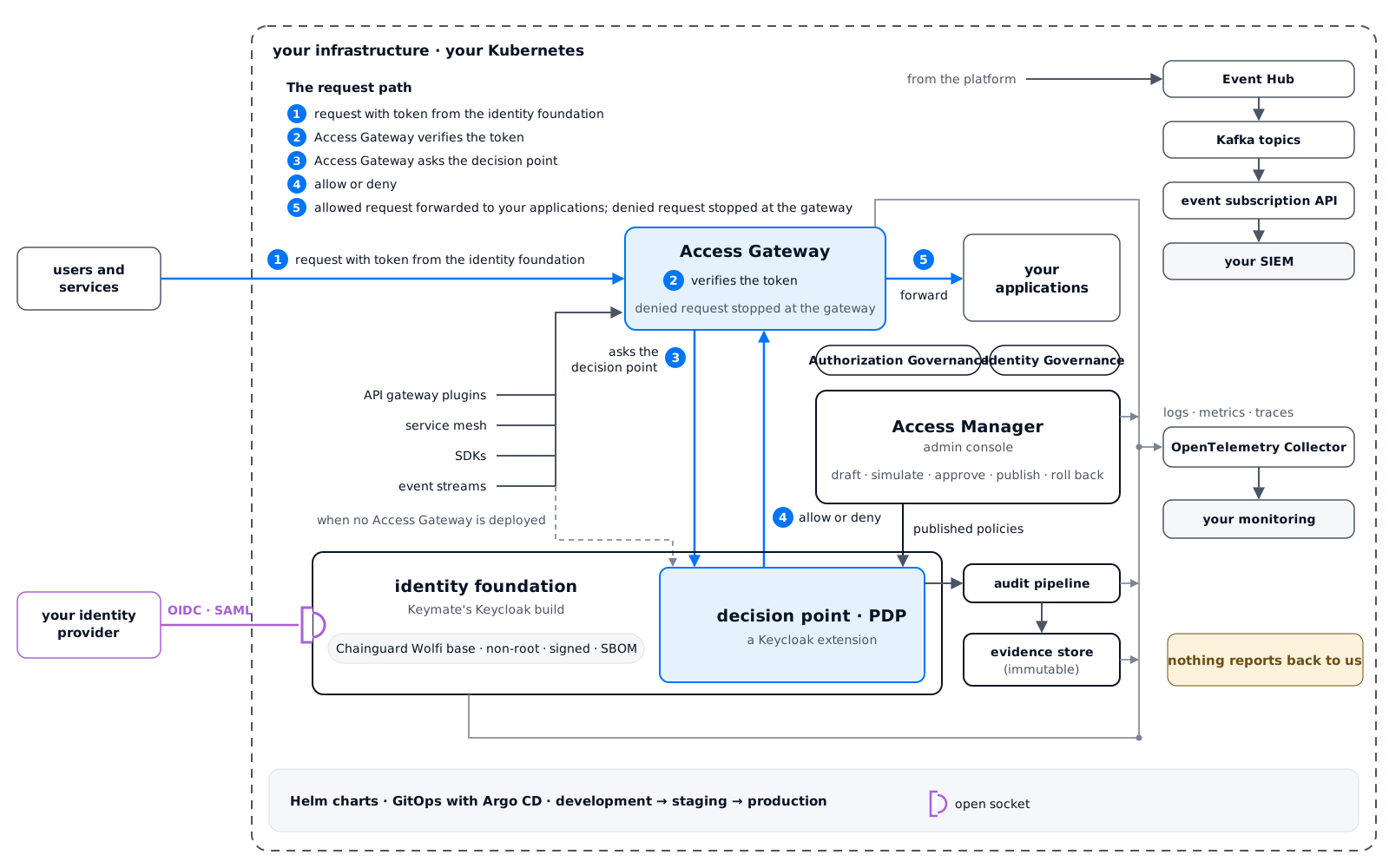
A request goes through five steps. The application only receives requests that were allowed.
- A user or a service sends a request with a token issued by Keymate's identity foundation, which is Keycloak.
- The Access Gateway verifies the token.
- The Access Gateway asks the decision point, passing the request with the user's organization context.
- The decision point evaluates the request against the active policies (roles, attributes, relationships, risk) and answers allow or deny.
- The Access Gateway forwards an allowed request to the application and stops a denied one there. In this path, the application code contains no permission check.
Each decision, with the policy version that made it, goes to the audit pipeline.
The Access Gateway is one of five enforcement points. The other four are API gateway plugins, the service mesh, SDKs and event streams. They send their checks through the Access Gateway when one is deployed, and ask the decision point directly when it is not. Every enforcement point gets the same answer from the same policies. Enforcement covers which enforcement point fits which application.
Inside the platform, components talk to each other over mutual TLS, and each workload has a SPIFFE identity.
Where the decision point runs
The decision point runs inside Keymate's Keycloak build, as a Keycloak extension. A different decision engine can be plugged in instead. The enforcement points and the admin console run outside it. The enforcement points ask it for decisions, and the admin console sends it published policies.
Keep your identity provider
Users can keep signing in through the identity provider you run today: Keymate federates with it over OpenID Connect or SAML, and authorization works the same whichever one authenticated the user. How to run both in parallel is on Parallel Run.
Where policies are written and published: the admin console
Policies are written in the admin console, in a visual editor or in the policy language, and go through Authorization Governance's change cycle: simulate, publish (you can require an approver first), roll back. The admin console also manages tenants, organizations and the relationships that relationship-based policies read, and it shows the audit view. Authorization Governance covers the cycle; Identity Governance handles joiners, movers and leavers from your HR system.
Deployment on Kubernetes with Helm and GitOps
Keymate runs on Kubernetes, wherever your Kubernetes runs, including air-gapped networks (Enterprise). Every component ships as a Helm chart, Keymate's Keycloak build included, so the whole platform installs with Helm. The documentation recommends Kubernetes 1.28 or later and Helm 3.12 or later.
The charts install in a fixed order: infrastructure (service mesh, certificate management), data (databases, caches, the event bus), the application layer (the identity foundation with the decision point inside it, the Access Gateway, platform services), then observability. There are two ways to run that installation:
| Path | How changes are applied | When teams choose it |
|---|---|---|
| Helm | helm upgrade with the values file for each environment | Direct control over each Helm release, few environments |
| GitOps with Argo CD | The desired state lives in a Git repository; Argo CD keeps each cluster in step with it, reports drift, and can restore the declared state | Several environments or installations, audit trail on every deployment change |
With GitOps, every deployment change, Keycloak included, is a commit with an author and a diff. Rolling it back is a Git revert. Keymate does not depend on how the cluster was created, whether with Terraform, your cloud provider's console or by hand.
Development, staging and production
Keymate runs as a separate installation per stage, usually development, staging and production, each with its own configuration, databases, domain and scale. Nothing is shared between stages, so a test in development cannot touch production data.
Changes move one way: development, then staging, then production. With GitOps, promotion is a pull request from one stage's configuration to the next. With Helm, it is an upgrade with the next stage's values file. Component upgrades follow the same path.
High availability
Keycloak high availability in Keymate means two or more replicas of each critical component: the identity foundation (Keymate's Keycloak build, with the decision point inside it), the Access Gateway and the platform services. The database runs as a primary and a replica. Disruption budgets keep a node drain from taking every replica offline. The decision point keeps no session state, so it scales with the Keycloak replicas it runs in. High availability is part of the Enterprise plan; see Pricing.
Hardened build and supply chain
Keymate ships its own Keycloak build, made from source on a Chainguard Wolfi base image rather than the default Keycloak container image. Wolfi is a minimal Linux base whose packages are rebuilt from source every day. When our hardened-image article was written, the runtime image held about 65 packages and no package manager, compiler or build tool.
Non-root.
The image runs as a dedicated user (UID 2000) and meets the restricted Kubernetes Pod Security Standard.
Signed, with an SBOM.
The image is signed with Cosign, so your cluster can verify where it came from. Its SBOM lists every package and library inside it.
CVEs in Keycloak's Java libraries patched at build time.
A vulnerability in a Java library that Keycloak depends on is patched when the image is built, without changing Keycloak's code or waiting for its next release. Operating-system packages can also be patched between builds when a new CVE is published.
Scanned before release.
Each image is scanned for known vulnerabilities. A finding that does not affect the image is recorded in OpenVEX, with the reason.
Keycloak themes and providers deploy as before.
Keycloak's public API and extension points are unchanged.
How the image was built, layer by layer, is in our article on Keycloak hardening. For the Keycloak settings that sit outside the image, the documentation has a pre-deployment checklist and a production hardening guide. What else Keymate adds to Keycloak is on Keymate vs Keycloak.
Observability: OpenTelemetry export and the decision stream
Every Keymate component ships instrumented with OpenTelemetry. Logs, metrics and traces go through one OpenTelemetry Collector to the destinations you configure. Keymate's built-in dashboards are optional.
The decision stream is Keymate's own signal: a live stream of every allow and deny, exported over OpenTelemetry to the monitoring you already run. A trace follows one request from the Access Gateway through the decision point, so a slow or denied request can be found by its decision identifier.
Events: Kafka streams and subscriptions
Keymate publishes what happens on the platform as events: policy changes, organization changes, and audit records of each decision. Platform services hand their events to an Event Hub, which stores each one before forwarding it to its own Kafka topic, so an event is not lost if the event bus is briefly unavailable.
Systems outside the platform subscribe to the events they need through the event subscription API, over gRPC or REST, and receive them over HTTP. A failed delivery is retried. One that keeps failing is kept for an operator to inspect and replay. That is how your SIEM receives audit events. Event streams are also an enforcement point. The same policies that govern web requests decide which application may publish to, or read from, which stream.
Air-gapped installation, with no call home
Keymate installs in a network with no path to the internet. It uses the same Helm charts and signed images as any other installation, copied into your private container registry and chart repository. Nothing is fetched at runtime: the Keycloak image holds everything it needs. The identity foundation, the decision point, the admin console, the event bus and the evidence store all run inside your network. Air-gapped installation is part of the Enterprise plan, as are OpenShift and high availability; see Pricing.
The product does not call home: it reports nothing back to us, and the OpenTelemetry Collector sends signals only to destinations you configure. New versions reach an air-gapped installation the way they entered it: as signed images and charts, with their SBOM, through your own registry.
What Keymate's IAM architecture does not include
A managed service.
Keymate is self-hosted only today. A managed service is on the roadmap, without a date.
Consumer-scale public sign-up.
Keymate is built for employees, customers and partners; it is not a consumer identity platform.
Further reading
- Keycloak hardening: how we rebuilt the Keycloak container on Wolfi, with build-time patching of Java libraries, a non-root runtime, signed packages, an SBOM and the Kubernetes settings it expects.
- Common Keycloak security mistakes: eight Keycloak security mistakes, most of them defaults, from the bootstrap admin to secrets in the realm export, each with its fix, tested on Keycloak 26.8.
Questions
What is the best hardened container image for Keycloak?
A Keycloak hardened image worth choosing is one whose hardening you can check yourself: it runs as a non-root user, it is signed and ships with an SBOM, it patches CVEs in Java libraries at build time and not only in the operating system, and it leaves Keycloak's extension points unchanged. Keymate's own build of Keycloak, on a Chainguard Wolfi base image and signed with Cosign, meets each of these checks. Our article on Keycloak hardening walks through how it is built.
How do I run Keycloak in an air-gapped environment?
Mirror the container image and Helm charts into a private registry, bake every theme and provider into the image so nothing is downloaded at startup, and point TLS and hostnames at your internal certificate authority and DNS. Keymate does this for the whole platform with the Enterprise plan: the same signed images and charts install in an air-gapped network, and the documentation's pre-deployment checklist notes the check to skip when there is no outbound internet access.
How do I keep a fleet of Keycloak instances consistent?
Declare each installation's state in Git and let a GitOps tool keep every cluster in step with it: Keymate supports GitOps with Argo CD, which reports drift and can restore the declared state, so every installation runs the same charts, versions and values. Every deployment change is then a commit with an author and a diff, and rolling it back is a Git revert. Policy changes go through the admin console's versioned cycle, including any approval, and every decision is recorded with the policy version that made it.
Which identity platforms can a bank run fully on-premise?
The ones that run every component in the bank's own data center, including the admin console, the decision point and the evidence store, and can run air-gapped if needed. Keymate is one of them: every component runs on Kubernetes in the bank's own data center, and air-gapped installation is part of the Enterprise plan.
Which CIAM platforms support fully air-gapped, on-premises deployment with no external network dependencies for highly regulated environments?
The ones that install every component inside your own network, fetch nothing at runtime, and fit the users you serve. Keymate meets these for employees, customers and partners: it runs fully air-gapped on your own Kubernetes with the Enterprise plan. It is not a consumer identity platform, so it does not fit public sign-up at consumer scale.
Is there a platform that supports both SaaS and self-hosted deployments including air-gapped environments?
Keymate is self-hosted only, including air-gapped networks with the Enterprise plan. A Keymate-managed service is on the roadmap, without a date.
How do you run an identity platform in an air-gapped environment with no call home?
Install it from images and charts copied into your own registry, and choose a product that reports nothing back to the vendor. Keymate does both with the Enterprise plan: every component stays inside your network, and telemetry goes only to the monitoring you configure.